Marvel Review
- Look and Feel - 8/108/10
- Features - 8/108/10
- Ease of Use - 7/107/10
- Pricing - 6/106/10
- Support - 8/108/10
Summary
Marvel is one of a kind design platform with a mission of bringing ideas to life. The simple to use online tool gives you the functionality to build any digital product with a bunch of features like design, prototype, collaborate at one place.
What is Marvel?
Well, Marvel app can best be described as a creative developer tool that enables designers to come up with interactive app prototypes without going through too much trouble. With Marvel, one can develop app demos within a short while, create functional prototypes with no in-depth coding knowledge, and share them with stakeholders. So if you want to turn your innovative thoughts and concepts into reality as far as prototyping is concerned, you may consider trying Marvel.
Features
Design
With this application, you do not need any advanced software knowledge or design experience to accomplish your app development objectives. Marvel app’s design feature is tailored to make your work pretty smooth because it’s both simple and intuitive. The mode allows users to access a library of elements and templates, therefore, all you need is right in your way. As such, better ideas and visualizing concepts across the board becomes pretty smooth.
Since the app provides for collaborations blending ideas and executing changes on designs done by a team comes easy so you can always have the best results. Ideally, anyone with an interest in design can take advantage of this tool to come up with beautiful assets and simulations because Marvel deviates from the widely held assertion that only experts can get comfortable with the sophistication of design software.
Wireframing
Marvel allows prompt wireframing with any device whether it is an iPhone, iPad, Android or desktop. With this, you can quickly turn conceptual ideas into a real wireframe. It facilitates perfection of initial steps in the design process thereby allowing users to have tangible content that can be shared and understood by others. Wireframing toolkit comes with all assets to enable unhindered focus on idea development. From the ability to drag and drop wireframe templates to unlimited access, it takes care of all individual and team wireframing needs.
Prototyping
The application is tailored to aid better presentation of ideas through realistic prototypes generated without any coding. Without much ado, you can convert mere design simulations to legitimate interactive mobile or web prototypes. Just upload pre-made screens from personal sketches or from tools such as Photoshop and then you can bring on hotspots, layers, and interactions as you proceed. And thanks to the ability to utilize user testing apps you can also go ahead and certify your works and keep user experiences at the fore.
Handoff
With Marvel, every update in the design process comes in real time. it allows the instantaneous creation of requirements and changing of the same into assets, code, and specs thereby saving users time and effort of going the manual way. Handoff provides for automatic sync with the most recent changes in design consequently eliminating chances of clatter or misrepresentation. In a single click, one can conveniently transfer assets and copy the CSS, Swift and Android XML code for their prototype regardless of where the design simulations have been created. With Handoff, the process of design visualization can be accelerated and made rather effortless.
Collaborations
Marvel offers the perfect platform for team collaboration. It provides a central space where everyone on your product design team can operate harmoniously. Colleagues can create, recreate, share ideas, and get feedback thereby making the process inclusive and transformative. The collaboration feature allows members instant access to a team’s working space beside allowing seamless organization of shared content consequently making joint effort neat and understandable. With Marvel’s activity notifications and user management feature keeping track of member roles and assembling teams comes easy.
Integrations
This app will allow you to connect with different tools that are popularly used in the design process. It has sufficient provisions for integrations with everyday tools important for in the stages of design workflow. Whether its the project activity Slackbots, Sketch plugins or embedding prototypes all the varying requirements have been catered for accordingly. Integrations simplify actions such as the addition of wireframes, designs and interactive prototypes to user documents, synchronization of content, sharing of ideas and collection of genuine feedback for different stakeholders.
List of Integrations
- Maze
- Jira
- Dropbox
- Confluence
- Lookback
- Sketch
- YouTube
- Slack
- Box
- Drive
- Niice
Pros:
- Accessible from anywhere
- Offers all it takes to build digital products from wireframe, prototypes to design specifications and more
- Provides for handy team collaboration
- Straightforward prototyping
- Takes out the complexity associated with building digital products
Pricing
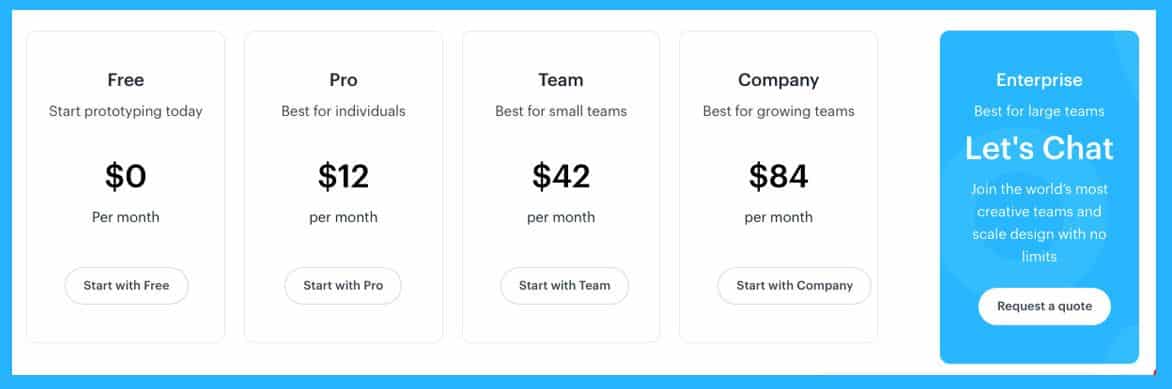
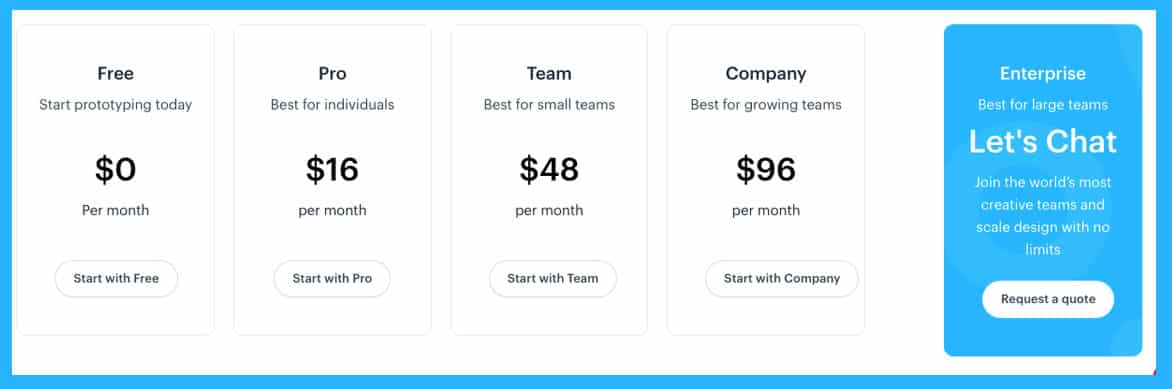
Marvel is available in flexible subscription plans however beginners can get started for free. You can either bill month to month or yearly which offers up to 25% savings. The plans include:-
Annual Plan
Monthly Plan
Marvel for Education
This is a special plan for teachers and student. It offers up to 70 % savings for the yearly subscription. To get on this plan you can contact the provider at education@marvelapp.com from your student/faculty email address.
Marvel for Non-Profits
This is a special plan dedicated to non-profits. It entitles them to 50% off yearly billing. Interested agencies can get in touch with customer support to get on the plan.
Conclusion
Marvel is certainly a fantastic pick for anyone with the desire to avoid the trouble of manual process of expressing different creative ideas. With it, you get the freedom to be creative because it opens almost every avenue to straightforward prototyping.