Webflow Review
- Look and Feel - 7/107/10
- Features - 8/108/10
- Ease of Use - 8/108/10
- Pricing - 8/108/10
- Support - 7/107/10
Summary
Webflow is SaaS based web application which allows designers to make websites and host them on the Webflow platform with ease. Designing or hosting needs no coding skills, all you have to do is to use the drag and drop interface to build your website, follow the steps to develop it and see it live within no time.
Overview
These days most website builders only pay great attention to platforms that simplifies their work. And while the market of web-creation and digital design tools offers more than a dozen alternatives only a few ticks the right boxes for individual and small teams of website builders. In the list of market hits, Webflow certainly makes the cut.
What is Webflow?
This is a website-building tool tailored to aid designers in their quest to come up with dynamic and responsive websites without having to deal with manual process of code cracking. Launched in 2013, Webflow platform can be used on Google Chrome or Safari allows creative minds to enjoy an incredible combination of a content management system, web hosting, code-free design elements and other user friendly features. It provides designers and developers with the cutting-edge they need to sketch, build, and launch adaptable websites in the most pleasant fashion.
Features
Design and develop at the same time
This website building platform comes with all the tools developers need to design and advance their concepts just by utilizing visual manipulation. It provides all the capabilities of CSS, HTML, and JavaScript to take help users take their works from simple layout and styles to some real, intuitive, and responsive. From typography, layout and positioning, timeline interactions, mouse-based motions, code exporting and more you can have it all. Webflow is compatible with all browsers so it will save you the headache of testing your product after design.
Content Management System
With Webflow you have a reliable system ideal for building intuitive content-driven sites that works for most developers. From scratch you can come up with content specifications, make additions, import data from CSV than design everything virtually. Webflow’s CMS works for all users because you only need to build a blueprint and then you can link with your preferred design. So it can help you avoid the inflexible templates, blog-centric content structures or complex code languages. It will allow you to customise content structures right on the same page. You can come up with meaningful references to content, replace changing element with CMS fields, create display filters and custom search feature, and collaborate in real time among other things.
Hosting
Webflow avails a single platform where designers, content mangers and their clients can access one of the most efficient hosting technologies in the market. Coming with world class speed and scalability, Webflow makes your site ready to handle traffic regardless of the level or location. It also provides an all-in-one site for teams to manage their website in a click. From a users terminal one can execute commands without the slightest hesitation.
Editor
This feature makes content management quite a walk in the park. The Webflow Editor harmonizes everything into one simple interface where you can create, write, and publish new content without delay. It eliminates typical messiness associated with complex dashboards or backend content management system. You can also edit content on the same page hence you have a way to structure your work and bring consistency without interfering with your website’s design.
Collaboration
Webflow allows users to link up with development partners and work harmoniously in content creation. On the platform one can see actions taken by another on their team and help keep track of changes as they come. It is also possible to make reviews of all data sets before publishing.
Interactions
When it comes building intricate and rich animations, Webflow’s Interactions toolkit offers a powerful blend of visual CSS and JavaScript. The application allows the creation of scroll-based parallax animations for easy transformation of design sizes, styles, and layouts. In essence, you can take expressions and presentations come alive with this web building platform.
Pros:
Features a highly customizable editor
Excellent web-building features
Webflow is available on competitive pricing plans
Great interconnectivity and integration
Extensive support available
Cons:
Takes some learning curve to maneuver
Limited integrations
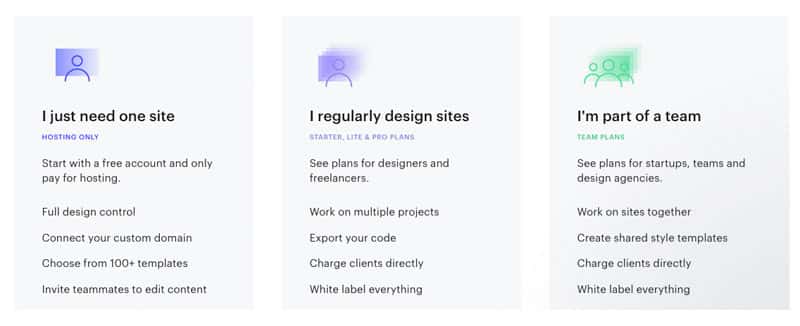
Pricing
Conclusion
Webflow boasts of potent blend of friendly website creation tools and content management system making it one of the top to-go choices for developers and designers. While it may appear a little sophisticated for some users, a little learning goes a long way in enabling maximum utilization of its features. All in all, it is worth trying out.