Notion.So
- Tool Look and Feel - 8/108/10
- Ease of Use - 7/107/10
- Pricing - 9/109/10
- Features - 8/108/10
- Support - 8/108/10
Summary
Notion is an all new task and project management tool which stands out different from the peers. Well the big question is what is the difference? Notion allows teams to collaborate not just on tasks but everything in relation to a project on the whole which makes it as one stop solution.
Introduction
At a time when Apps, software, and productivity tools are pretty much the order of the day, creative minds and tech-savvy individuals are always on the lookout for reliable resources to help them stay ahead in the game. And with new arrivals almost coming every other day, it’s natural that different users will only jump onto something that helps them boost productivity besides providing an outstanding experience. Among the numerous project management tools that exist today, Notion certainly stands out.
One quick question you might want to ask here. What as Notion got to do with UX Design or Design in general? Well, the answer is simple. Designers also work in a collaborative environment where tasks can be listed and worked upon and tools like Notion come handy to all people involved in a project.
What is Notion?
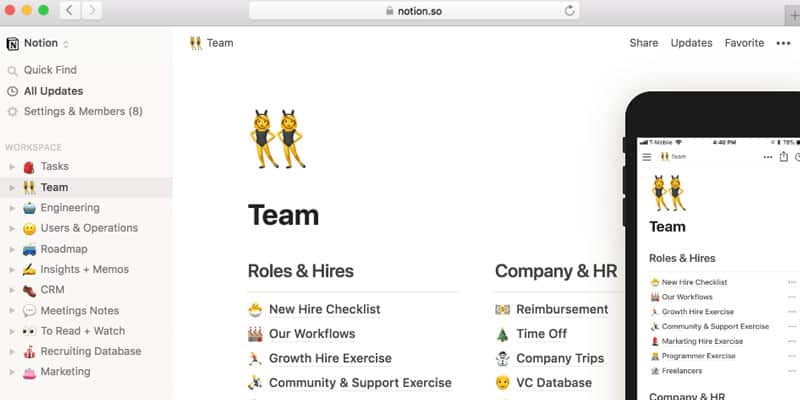
Well, Notion is a rare renaissance app that provides an all-in-one workspace for both teams and individuals in as far as managing different projects and tasks is concerned. It’s basically like a folderless organization that contains everything you need such as documents, notes, tasks, wikis, database, and more to help you manage workload quite efficiently. Naturally, everyone wants considerable flexibility in how they manage their tasks. Switching from tab to tab or being forced to rely on several productivity Apps is never appealing, and that’s precisely where Notion comes in handy.
This tool eliminates the need to alternate between multiple tabs and programs by providing a complete all-inclusive platform for the better working experience. Notion dates back to 2016 when the first version was launched and has been improved over time to the current Notion 2.0 and Notion 2.1 specific for Android. If you are tired of the chaos that characterizes the use of a plethora of productivity tools, below are some of the features that make Notion the go-to resource in organizing team or individual activities and projects.
Features
Blocks
A block can best be described as the essential feature of this tool. Every time you begin on a fresh page, any distinct content you add onto the blank grid say a to-do item, image, bulleted list, paragraph of text, code snippet, picture, embedded file, a YouTube video, or a PDF document you can basically think of it as a block. Ideally, Notion allows you to insert several blocks in one working space and then you can reorder, organize, and make in other changes in line with your needs to form the core of your content.
Wikis
If you need a Wiki, Notion provides a simplified interface that almost mirrors a website that allows effective collaboration of users in content creation. At one place you can easily edit, organize, maintain, and keep all your important information.
Notes and Documents
Notion provides a friendlier workflow for documents and tasks seamlessly blending the two and consequently eliminating the need to switch context when working. For example, if you are fed linking Google Docs and Trello, this tool can save you the trouble. With over 30 media types you the experience can’t be any better.
Knowledgebase
With Notion forget about the hassle of information from your team because the knowledge base feature centralizes all the essential content and more. Knowledge base allows effortless access to group ideas through quick search option and role definition. This way you can avoid wasting time figuring out answers from the rest of the team.
Tasks and projects
When it comes to managing tasks and projects, Notion offers one of the most flexible experiences you can find. It’s lightweight yes but will facilitate smooth handling of issues as you wish. It makes it easy to create tasks on new grids and work out a to-do list.
Database and Spreadsheets
It can be challenging to manage your projects efficiently without a way to capture unique data and workflows. With Notion, you have a way to store records without getting lost in between an avalanche of tabs.
Compatibility
Notion is available in all the versions you need for individual and group tasks. There is the Web tool that allows full access from any location, the Desktop App for both Mac and Windows designed to guarantee exceptional writing experience, and the Mobile App for both iOS and Android. Regardless of the version you are using, the tool is devised to give better viewing experience
Ease of use
While a user may probably need some time to familiarize with Notion to enjoy all the features accordingly, the simplicity is overall design certainly makes it user-friendly. You can easily find your way through the neat and well-organized user interface. With features such as one-click export and keyboard shortcuts coupled with unique, fast, distraction-free editing interface, you can choose your workflow, keep the focus and get on your projects without the slightest hesitation. Tracking group and individual tasks is quite a piece of cake.
Collaboration
Notion can help a business avoid the confusion that in most cases reduce the productivity of teams. It allows collaborative content development, editing, and commenting not to mention the advance administrative permissions that help in assigning tasks. In essence, it enables everyone on the team to work harmoniously all in one place.
Working offline and Sync
With Notion you can begin your project online and complete them offline without losing any block of data. Since it permits real-time synchronization of devices that an individual or team uses you can enjoy unrestricted access at all times.
Pros:
- Allows flexible management of individual and team projects
- Easy on-boarding
- Provides for unrestricted access including offline
- Offers the perfect balance of features to help boost outcomes
- Customizable and distraction free
Cons:
- Offline access is limited to only recently opened pages
- Some users seem to find the pricing not competitive
Pricing
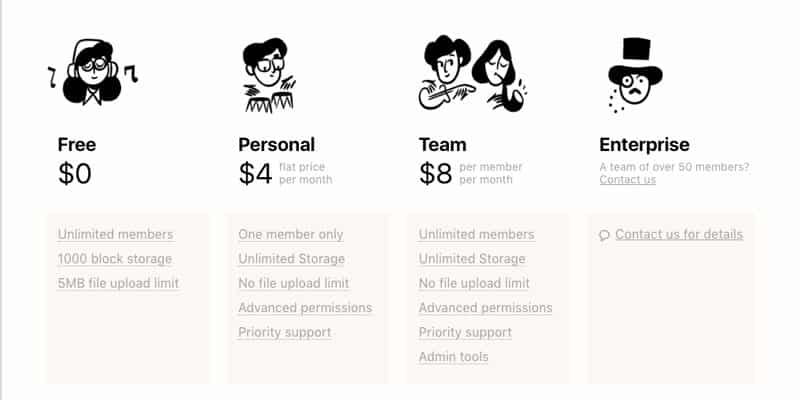
This tool comes with three subscription plans as follows:-
Conclusion
Whether you are a single designer or a team of creative minds, Notion can help you enjoy the excellent desktop working experience by bringing more organization into your projects. If you have never been persuaded by productivity applications before, the efficiency and flexibility that this tool brings to the workspace should be enough reason to make you hit the ground running in a different way.